Newsletter Subscribe
Enter your email address below and subscribe to our newsletter
Enter your email address below and subscribe to our newsletter
The Complete Guide to Solopreneur Tools You Actually Need in 2025
Look, running a one-person business is no joke. You’re the CEO, the marketing team, the designer, the accountant, and the customer service rep—all rolled into one exhausted human being. And without the right solopreneur tools in place, the load gets even heavier. I’ve been there, running a business as solo for 10 years, staring at a to-do list that would take three people to finish, wondering how anyone does this without losing their mind.
Here’s the truth: you can’t do it all manually. You’ll burn out, drop balls, and probably lose clients in the process. But the right tools? They multiply your impact and let you compete with teams ten times your size. I’m not talking about collecting shiny apps you’ll never use—I mean the essentials that actually move the needle.
This guide breaks down every category of tools you need, with honest recommendations for both premium picks and solid free alternatives.
Why you can’t skip this: Your visuals are often the first impression potential customers get. Showing up with amateur graphics is like showing up to a pitch meeting in pajamas. You don’t need to be a designer, but you need to look like you hired one.
I resisted Canva for way too long, thinking “real designers” don’t use templates. Then I tried it for one Instagram post and never looked back.
The platform has templates for literally everything—Instagram stories, presentation decks, ebook covers, business cards, LinkedIn banners. What makes Pro worth paying for is the Brand Kit feature that stores your logos, colors, and fonts so every single thing you create stays consistent. No more hunting through folders for “that logo file” or copying hex codes from old posts.
The background remover alone has saved me hours of Photoshop frustration. And magic resize? Truly transformative. Design once, click a button, and Canva reformats it for every social platform instantly. For someone juggling a million tasks, that kind of time-saving is priceless.
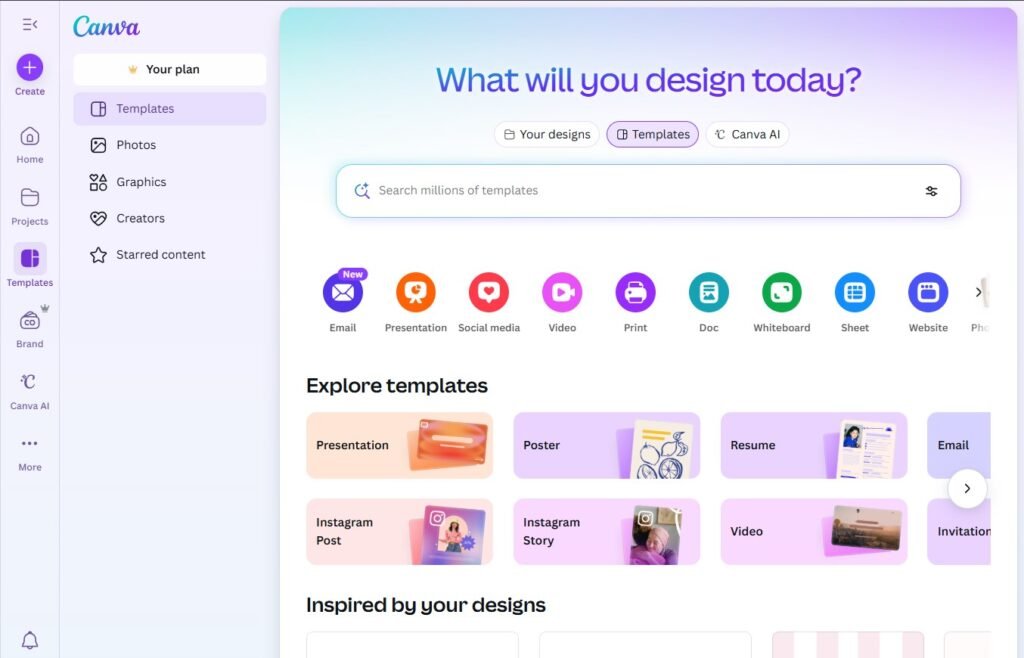
Even without paying, Canva’s free tier is extremely good. Thousands of templates, the same drag-and-drop editor, 5GB of cloud storage. When I first started out, I used the free version for sometime and never felt limited.
Sure, some premium templates are locked, and you can’t save brand kits. But honestly? You can create professional-looking social graphics, simple logos, and client-facing PDFs without touching those features. Start here. Upgrade when you’re actually making money.
Why you can’t skip this: I’ve actually lost multiple clients simply because I didn’t have a proper system to manage them. When you have just a handful, it’s fine—you can keep everything in your head or buried somewhere in your inbox. But once you cross 20 clients, for me, things started slipping through the cracks fast. Missed follow-ups, forgotten tasks, unanswered messages… and before you know it, opportunities disappeared. A CRM would’ve saved me from a lot of those losses.
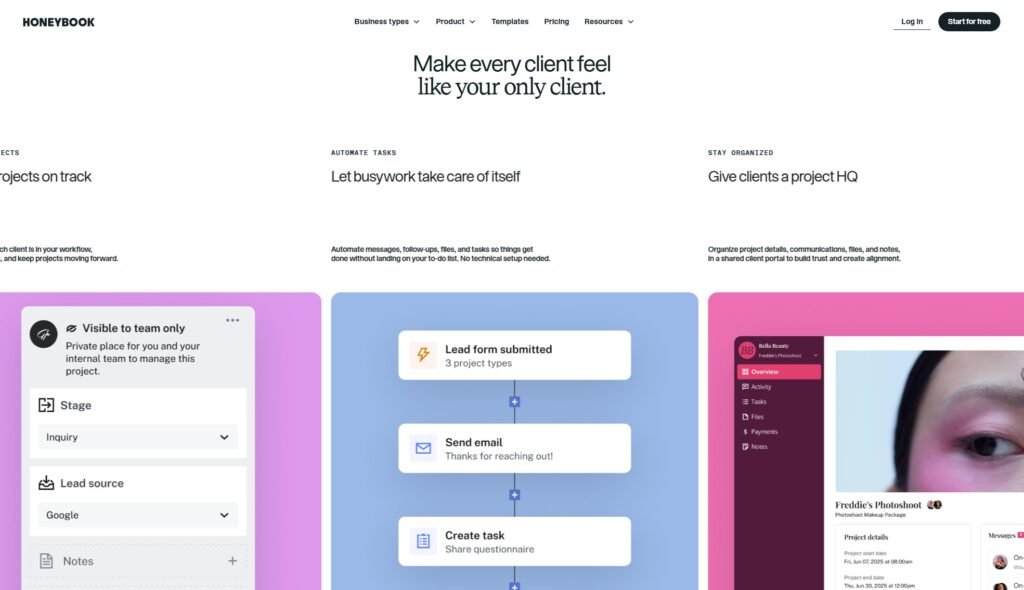
HoneyBook was built specifically for people like us—solopreneurs and creatives who need to look professional without enterprise-level complexity. It handles client onboarding, project tracking, contracts, invoices, and scheduling in one place.
But the real magic is workflow automation. I set up a client onboarding sequence once, and now HoneyBook automatically sends welcome emails, contract reminders, invoice follow-ups, and questionnaires without me touching anything. It’s like having an assistant who never sleeps and never forgets.
The client portals are clean, everything’s branded to your business, and you can accept payments right in the platform. If you’re running a service business—consulting, design, photography, coaching—this could be the one.
Notion isn’t technically a CRM, but you can build your client management systems in it that work better than some paid tools. Create a database, add custom properties (stage, next action, revenue), link it to project notes, and you’ve got a totally personalized pipeline.
It takes an afternoon to set up, but then it’s yours—exactly how your brain works, with zero bloat. If you want something more traditional out of the box, Bigin by Zoho has a solid free tier with contact management and basic pipeline features.

Why you can’t skip this: Social media platforms can vanish overnight (RIP reach on Facebook). Your email list? That’s the audience you actually own. It’s also where the money is—email converts better than any other channel, period.
Flodesk is popular among solopreneurs who want visually polished emails without spending hours designing. Its templates are clean and modern, and the flat‑rate pricing model is appealing if you expect your list to grow over time.
ConvertKit is another strong option, especially for creators selling digital products or running course‑based businesses. It’s known for clear segmentation, sensible automation workflows, and flexibility for building funnels without code.
Both tools integrate well with most platforms, include solid analytics, and offer designs that feel current rather than outdated.

Mailchimp’s free plan gives you 500 contacts and 1,000 sends per month. When you’re starting out, that’s plenty. The drag-and-drop builder is straightforward, you get basic automation (welcome series, birthday emails), and the reporting shows who’s opening and clicking.
The interface feels dated compared to newer tools, and their pricing gets expensive fast once you outgrow the free tier. But for getting your email list off the ground? It works.
Why you can’t skip this: I used to keep tasks in my head, scattered across notes, texts to myself, and paper lists. Then I’d wake up at 3 AM remembering something I forgot. If your system is “try to remember everything,” you’re already failing.
ClickUp is insanely powerful and almost infinitely customizable. I can create project templates, automate repetitive tasks (like “when task moves to Done, notify client”), switch between Kanban boards and calendars depending on my mood, and integrate it with literally every other tool I use.
Fair warning: the learning curve is real. I spent a whole weekend setting mine up and felt overwhelmed. But once you dial it in, ClickUp becomes your business command center. Everything lives there—client projects, content calendars, business strategy, random ideas.

Trello is beautifully simple and perfect if you think visually. Create boards for different projects, add task cards, drag them through stages as you work. I used Trello for several years before outgrowing it, and it never let me down.
Butler (Trello’s automation feature) is surprisingly powerful for a free tool—set rules like “when card moves to Complete, post in Slack channel” and forget about it. The free plan gives you unlimited cards and boards, which is basically everything most solopreneurs need.

Why you can’t skip this: If you’re still doing the “What times work for you?” email dance, you’re wasting hours every week and looking unprofessional. Scheduling automation is one of those things that seems small but changes everything.
SavvyCal is what happens when someone actually thinks about the user experience of booking meetings. You can suggest preferred times while still giving flexibility, overlay multiple calendars so you’re never double-booked, and create personalized booking links for different services.
It feels modern and makes you look modern. When a potential client gets your SavvyCal link instead of a Calendly link everyone else uses, you stand out a little.

Calendly basically invented this category and the free plan still works great. Set your working hours, add buffer time between meetings, let clients pick slots that work for them. Email reminders reduce no-shows, and it syncs with Google Calendar, Outlook, and iCloud seamlessly.
The free version limits you to one event type, but unless you’re running a complex scheduling operation, that’s usually enough to start.

Why you can’t skip this: This isn’t 2022 anymore. If you’re not using AI, you’re working 10x harder than you need to. I use ChatGPT every single day—drafting client emails, brainstorming content ideas, analyzing spreadsheets, researching competitors. It’s like having a smart assistant who never complains.
I pay for ChatGPT Plus ($20/month) and consider it the best $20 I spend every month. GPT-5 writes better, thinks better, and handles complex tasks the free version just can’t. I’ve used it to write entire proposals, debug website code, analyze survey results, and plan content calendars.
Claude Pro is equally good with a slightly different vibe—better at maintaining context in long conversations and producing more nuanced writing. I know solopreneurs and a lot of developers who use both depending on the task.
When I calculate how many hours these tools save me weekly, the ROI is absurd.
The free version of ChatGPT still handles tons of use cases. I used it exclusively for months before upgrading—drafting emails, brainstorming, basic content creation, quick research.
Pair it with Google Gemini (which has strong web search built-in) and you’ve got a powerful free combo. For automation, Zapier’s free plan connects your key apps with simple workflows like “new Calendly booking → add to CRM”.
Why you can’t skip this: Messy finances aren’t just stressful—they cost you real money in missed deductions and tax penalties. I learned this the hard way my first year when tax time turned into a nightmare of digging through bank statements and guessing at categories.
QuickBooks is the gold standard for a reason. It handles invoicing, expense tracking, automatic tax categorization, P&L reports, and connects to your bank for automatic transaction imports. The mobile app lets you snap receipts on the go, which has saved me countless times.
It’s more expensive than simpler tools, but when tax season rolls around and everything’s already organized? Worth every penny.

Wave is completely free for invoicing and basic accounting—they make money on payment processing fees. You can send unlimited invoices, track expenses, scan receipts, and generate basic financial reports. The interface is clean and surprisingly full-featured for free.

Why you can’t skip this: Losing client files or important documents because your laptop died is a special kind of panic. Cloud storage means your work lives everywhere and nowhere—accessible from any device, automatically backed up.
For $6-12/month, Google Workspace gives you professional email (yourname@yourbusiness.com), Drive storage (30GB to 2TB), plus Docs, Sheets, Calendar, and Meet. Everything syncs instantly, sharing with clients is dead simple, and the search actually works.
Having email and files in one ecosystem just makes sense. Plus, clients already know how to use Google tools, so there’s zero friction when collaborating.
The personal free account includes 15GB of storage across Drive, Gmail, and Photos. If you’re organized about what you store, that’s enough for most solopreneurs starting out. You get the full productivity suite (Docs, Sheets, Slides), real-time collaboration, and mobile access.
I ran my entire business on the free plan for a long time before needing more storage.
Why you can’t skip this: Video builds trust and connection in ways email just can’t. And async video tools? Those changed how I work. Instead of typing a novel explaining something, I record a 3-minute Loom and send that. Clients love it.
Zoom is still the professional standard for live meetings. The quality is reliable, everyone knows how to use it, screen sharing works perfectly. I’ve tried cheaper alternatives and always come back to Zoom.
Loom is where real productivity happens. Record your screen and face to explain concepts, give feedback on designs, walk through processes, or onboard clients. A 5-minute Loom replaces a 2-page email and clients can watch on their schedule.

Google Meet’s free tier offers one-hour meetings, screen sharing, and real-time captions. It integrates with Calendar for easy scheduling and works reliably for most video calls.
Loom’s free plan caps videos at 5 minutes, but that’s actually enough for most use cases. The constraint forces you to be concise, which usually makes the videos better anyway.
Why you can’t skip this: Posting consistently builds your audience, but logging into five different platforms every day is exhausting. I tried that for three months and nearly gave up on social entirely. Scheduling tools let you batch-create content once a week and maintain presence without the constant context-switching.
Buffer’s paid plans offer a clean, focused experience. Load up your queue, set optimal posting times, and it handles the rest. The analytics actually make sense instead of drowning you in meaningless metrics. Particularly strong for LinkedIn and Instagram.
Metricool is the value pick—similar features at a fraction of Buffer’s price. The interface isn’t as polished, but it gets the job done and includes basic design tools too.

Buffer’s free plan supports three social channels with 10 scheduled posts each. That’s actually enough if you’re focused on just a couple platforms. The scheduler is simple and reliable—no nonsense.
Meta Business Suite (free) handles Facebook and Instagram scheduling, analytics, and unified inbox. If those are your main platforms, it’s surprisingly capable.
Why you can’t skip this: I thought I knew where my time went until I actually tracked it. Turns out I was spending 6 hours a week on admin tasks I could’ve automated or outsourced. You can’t improve what you don’t measure.
Clockify’s free tier is shockingly generous—unlimited tracking, projects, and users. The interface is clean, reports show exactly where billable hours go, and you can categorize by client or project. If you do any hourly work, this pays for itself by ensuring you bill for everything.
Toggl Track is slightly more polished with better reporting on paid plans, but both nail the core functionality.

Since Clockify’s free plan is already so robust, just use that. The browser extension makes starting timers effortless—one click and it’s tracking. The mobile app means you can track from anywhere, which is clutch for client calls or meetings.
Why you can’t skip this: Using the same password for everything is asking to get hacked. I know it’s tempting—I did it for years. Then a service I used got breached and I spent a panicked weekend changing passwords on 50+ accounts. Never again.
1Password balances strong security with an interface that doesn’t feel like a tech product. Features like Travel Mode (temporarily hides sensitive data when crossing borders) and Watchtower (alerts you to compromised passwords) make it the premium choice.
The business plan includes shared vaults for client credentials, which is invaluable if you manage client accounts.

Bitwarden is open-source, security-audited, and trusted. Unlimited password storage, sync across all devices, and basic two-factor authentication—completely free. The interface is more utilitarian than 1Password, but the security is rock-solid.
I used LastPass for five years, but after the leaks and the mobile app getting increasingly twitchy, I moved to 1Password.

Why you can’t skip this: Your website is your digital storefront. If it looks unprofessional, loads slowly, or confuses visitors about what you do, you’re losing business. I’ve seen amazing solopreneurs with terrible websites wonder why they’re not getting clients.
Webflow gives you designer-level control without code. The visual editor is powerful, SEO tools are built-in, hosting is included. It’s become the go-to for design-forward solopreneurs who want something truly custom.
Squarespace is easier—beautiful templates, drag-and-drop editing, everything (domain, hosting, SSL) bundled together. You sacrifice some flexibility for simplicity, but most of us don’t need Webflow’s power anyway.

WordPress.com’s free tier works but shows ads and gives you a wordpress.com subdomain. It’s clunky compared to modern builders but functional if you’re truly bootstrapping.

Why you can’t skip this: Ideas, meeting notes, research, and random thoughts need a home. For years mine lived across Apple Notes, random Google Docs, paper scraps, and texts to myself. Finding anything was impossible. A good note system becomes your external brain.
Notion is my second brain at this point. Notes, databases, wikis, project trackers, client portals—all in one place. You can link notes together, embed content, create templates, and build systems that fit exactly how you think.
The learning curve is steep—I spent hours watching tutorials before it clicked. But once you’re fluent, Notion is indispensable. I used it for databases, clients, projects, content ideas, business strategy, and random thoughts all interconnected.

Notion’s free plan is genuinely robust. Unlimited pages and blocks for individual use. You only hit limits with large file uploads or team collaboration features.
Obsidian is free for personal use and beloved by power users. It stores notes as plain markdown files (you own your data completely) and excels at linking ideas together. The interface is minimal, which I love but some find intimidating.

Why you can’t skip this: Collecting information from clients—intake forms, feedback surveys, registration forms—should be easy for them and automatically organized for you. Email threads asking for the same info repeatedly look unprofessional and waste time.
Typeform creates conversational, one-question-at-a-time forms that feel more like conversations. Completion rates are significantly higher than traditional forms, which matters when you’re qualifying leads or onboarding clients.
JotForm offers 10,000+ templates and handles complex use cases—payment forms, conditional logic, file uploads. It’s more utilitarian but extremely flexible.

Google Forms is simple, free, and works. Unlimited forms, automatic response collection in Sheets, basic logic. It’s not beautiful, but it gets the job done for straightforward surveys or contact forms.
Tally is newer and offers unlimited forms on the free plan with a modern interface—essentially a free Typeform alternative.

Why you can’t skip this: Professional proposals win more work. I’ve seen solopreneurs with better skills lose projects to competitors who just presented better. And chasing clients to sign contracts via email? Painful. Digital signatures speed everything up.
Bonsai is built specifically for freelancers—proposals, contracts, invoicing, time tracking, client management in one platform. The templates are solid (I’ve used them to close $50K+ in projects), e-signatures are included, and it automates follow-ups on unsigned contracts.
PandaDoc has more enterprise features but is probably overkill unless you’re sending dozens of proposals monthly.

HubSpot’s free CRM includes basic proposal functionality—not as polished as dedicated tools, but functional and integrated with your contacts.
Alternatively, create proposal templates in Google Docs or Notion and use DocuSign’s free tier (3 documents/month) for signatures. It’s manual but costs nothing when you’re starting out.

Why you can’t skip this: Dedicated landing pages convert way better than sending traffic to your homepage. When I started building specific landing pages for each service instead of directing everyone to my generic homepage, my conversion rate tripled.
Unbounce excels at optimization—built-in A/B testing, dynamic text replacement, conversion-focused templates. It’s the choice for serious marketers running paid traffic.
Leadpages is more affordable with solid templates and faster learning curve. It handles most landing page needs without Unbounce’s complexity.

Carrd’s free plan supports basic landing pages—perfect for testing ideas before investing in premium tools. The designs are clean and modern, though you’re limited to three sites.
Google Sites is clunky but free. It’s not winning design awards, but it works for simple lead capture.

Why you can’t skip this: “I think this is working” isn’t a business strategy. I spent six months creating content I thought people wanted before checking analytics. Turns out I was completely wrong about what resonated. Data tells you what’s actually driving results.
GA4 is free, powerful, and industry-standard. It tracks website traffic, user behavior, conversion funnels, demographics. The learning curve is real (GA4 is complex), but countless tutorials exist.
For deeper insights, I use Hotjar (freemium) to add heatmaps and session recordings. Watching real users navigate your site reveals usability issues analytics alone can’t.

Since GA4 is already free, that’s the move. Pair it with Google Search Console (also free) to understand SEO performance and which keywords bring traffic.
Why you can’t skip this: Real-time chat on your website captures leads who won’t fill out forms. I added live chat and immediately started getting questions from visitors who otherwise would’ve just left. Some of those chats turned into my best clients.
Tidio balances features and affordability. Live chat, chatbots for FAQs, email integration, mobile app. The chatbot handles common questions 24/7, and you personally handle complex stuff via the app.

Tawk.to is completely free for unlimited agents and chats. You get live chat, visitor monitoring, ticketing, knowledge base. The catch is they make money on upselling paid features, but the free tier covers everything most solopreneurs need.

Don’t try implementing everything at once. That’s how you end up with 30 unused app subscriptions draining your bank account. I know because I did exactly that.
For example, start with these five essentials:
Get those working smoothly first. Then add tools that solve specific pain points you’re actually experiencing. Feeling the problem makes you appreciate the solution—and you’ll know exactly what features matter.
Avoid shiny app syndrome. Every tool promises to revolutionize your workflow. Most won’t. I’ve wasted hundreds of dollars on tools I used twice and forgot about. Stick with tools that solve real, current problems.
Start free, upgrade strategically. Test free plans or trials before committing to annual subscriptions. Upgrade when you’re actively hitting limits or missing specific features—not because a tool looks cool in someone’s YouTube video.
Integration matters more than you think. Tools that talk to each other multiply their value. I use n8n to connect my processes to my email tool to my project management— many aspects of my work are automatically solved. When choosing between similar tools, pick the one that plays nicely with the rest of your stack.
With the right set of solopreneur tools, you move faster, look more professional, and win more clients. The right tools don’t just save time—they let you deliver better work, serve more clients, and compete with companies twice your size. Build your stack thoughtfully, and it becomes your unfair advantage as a solopreneur.